
EZ Artist 2.0 & EZ Rip Upgrade


Upgrade from FastARTIST & FastRIP For Fast T-Jet Printers

Windows XP, Vista, and Windows 7 Compatible! This upgrade adds new and enchanced features for current users of FastARTIST and FastRIP. If you do not have or not technical with Photoshop, EZ Artist makes cutting out the backgrounds a snap. New Plugins help with that small low resolution art work to print larger and sharper at a high resolution.

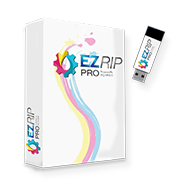
With EZ RIP, you can print directly from graphics programs like Corel Draw®, Adobe Photoshop®, or Adobe Illustrator. EZ Artist is compatible with Windows XP, Windows Vista and Windows 7.

EZ Artist offers:

  • Super Size Image that allows resizing of an image from low resolution bitmaps to clean high resolution image for output
  • Fluid Mask plugin that allows removal of backgrounds/colors for better underbasing options
  • Prepress proofing option to see how the image will print
  • Wizard for image prep before converting the file to vector
  • New Plugins for design - Lighting Effects, Sphere Effects, Postization, Warp Effects, Lens FX
  • GIMP - Bitmap editor for users without Photoshop

EZ RIP offers:

Multiple Queues

  • Setup a queue for white shirts and another for black shirts
  • Or a queue for Sleeves
  • Each queue can be access directly from EZ ARTIST or via control panel from any application

Costing Interface and Ink Calculation

  • Find out how much a garment will cost to print, even before you print it
  • Exact Ink usage calculation
  • Garment cost, Taxes and Labor cost can all be accounted for
  • Export for use in Excel and other database programs
Automatic Underbase for Printing from Graphic Programs
  • Can now generate the underbase from transparency directly in EZ RIP
  • No longer need to use EZ Artist
  • Adobe PhotoShop, Corel Draw, or Adobe Illustrator users can work without EZ Artist
  • Full support for trapping and highlight white

Templates for Multiple Shirt boards

  • Allows you to create and position print areas
  • Use to create and setup your own shirt boards
  • Can be used for 3 UP (Blazer Pro), no longer requires 3 shirts to be laid out in EZ Artist.
    • Will automatically layout the jobs in EZ RIP
  • Use for copies for Golf balls
  • Can even be used for a pocket and a cap at the same time
  • Hot folder support for batch processing


1.
Purchase the correct upgrade for your printer. Contact Sales at 1.800.408.0040 or International (01) 201.797.1504.
Click Here to Order the EZArtist Upgrade from the Equipment Zone Online Store.

EZ Artist & EZ RIP (Compatible with Windows XP, Vista, Windows 7) - Click Here to Order an Upgrade Online
The package includes the EZ Artist / EZ RIP Installation CD, Printer Packages CD, Tools and Extras CD, LCF files for your current dongle, and Reference Manuals for EZ Artist and EZ RIP.
  T-Jet SDT, 1, 2, 3 T-Jet Blazer Express, Pro T-Jet Jumbo 1, 2
Upgrade Cost: FastARTIST™/FastRIP™ 1.0-1.5.1 or 2.0 to EZ Artist/EZ RIP $395 $595 $649

2. Once purchased, Equipment Zone will send you new software CDs and a new manual by mail. Upgrades usually take 1 business day to process. If you need any help installing your software, submit a support ticket at http://support.equipmentzone.com and the Equipment Zone support department will be happy to assist you.

3. Click on the following link to see the new EZARTIST features - EZARTIST Features


Sales, Parts and Technical Info

17-20 Willow Street
Fair Lawn, New Jersey 07410, USA

Phone: 1-800-408-0040 or (01) 201-797-1504
Fax: (01) 201-797-1505
E-mail: Sales@EquipmentZone.com