Digital T-Shirt Printer


Harry's T-Jet
Maintenance Guide

Fast T-Jet Digital Garment Printers

 
Fast T-Jet Direct-To-Garment Digital Printersst T-Jet Direct-To-Garment Digital Printer


Want to know more about the upkeep of your Fast T-Jet? Check out this guide to direct-to-garment printer maintenance.
 
By Harry Oster
 
 
As someone involved with repairing and refurbishing digital garment printing equipment, I can tell you that I see some machines in unbelievably dirty condition. In the same way that some screen printers neglect their presses, some digital decorators fail to clean and maintain their digital printers, causing themselves unnecessary headaches and expenses. That's a shame when you consider how quick and easy it is to maintain your digital printer.
 
If you purchased a brand-new automobile, you wouldn't simply drive it endlessly without performing regular maintenance tasks like oil changes and tire pressure checks.
 
Similarly, when you purchase a Fast T-Jet Digital Garment Printer, you need to give the machine some occasional TLC. Doing so will go a long way in extending the mileage of your T-Jet printer, ensuring that it has a trouble-free, efficient life. What's more, properly maintaining your T-Jet printer can help you save ink, minimize the frequency of head-cleanings and nozzle checks, avoid wasting garments, and avoid replacing print heads and other components.
 
Your Regular Routine
 
Set aside five minutes at the end of each work day to clean your T-Jet. Use a gentle liquid, like Formula 409 or isopropyl alcohol and a paper towel to wipe the outside of the machine, for cosmetic reasons if nothing else. Then, use a swab to gently clean the inside. Use the special swabs that came with the printer to clean it. Avoid Q-tips, which can leave cotton debris on the unit. Pay particular attention to the rubber gasket on the capping assembly, where ink buildup can lead to clogging. Also, wipe away any excess ink from the sloped areas to either side of the print head, but make sure to avoid touching the print head itself.
 
On a weekly basis, you should clean the encoder strip. The strip has a nearly invisible pattern embossed on it that tells the print head where it is at any given moment. If that pattern is dirty, the printer can't read it. If you turn on the printer and the print head wanders back and forth aimlessly there is a good chance that the cause is a dirty, or scratched, encoder strip. Clean the strip using a standard alcohol wipe available from most drugstores, making sure to always wipe towards the spring to avoid stretching it.
 
Drugstores also sell a product called Swipes, an eyeglass cleaner that doubles as the perfect encoder strip cleaning tool. Swipes look like tweezers with two circular pads on the ends. Put a little Windex spray on the pads, squeeze them together and wipe until the encoder strip is clean.
 
Each month, you'll need to oil the printer's rails using an extremely light coat of 3-in-1 machine oil. Lubricate the metal rail that the print head rides on. While you're at it, clean out any lint from the belt that drives the print head. Otherwise, the belt may skip during printing.
 
Spare Parts
 
This daily/weekly/monthly maintenance routine should work well for most users. If you're a power user, you'll want to have certain parts available as replacements, as natural wear and tear will eventually require new parts. For instance, keep an extra encoder strip handy - it's a relatively inexpensive part. For many printers it is at less than $20.
 
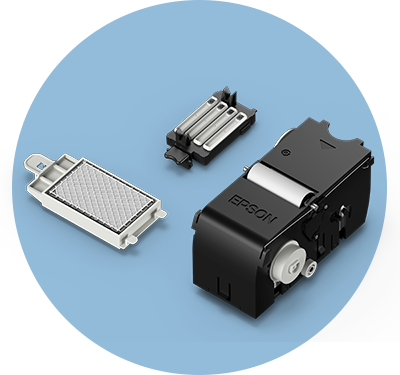
It's also handy to have an extra capping assembly, the part that the print head sits on. A capping assembly acts like a vacuum cleaner, sucking out the waste ink when you do a head cleaning. This part is constantly working, so you may need to change it out once or twice a year. A capping assembly runs anywhere from $60 to $295, depending on what type of machine you have.
 
You also should keep spare waste pads. This 2" x 2" part, which costs just a few dollars, sits on the side opposite the print head to absorb excess ink, keeping it from spreading all over the machine and gunking things up. (Blazer and Jumbo models do not have these pads.) Whenever you see a large build-up of ink on the pad, it's time to change it out for a new one. Make this checkup part of your daily or weekly maintenance routine. Likewise, if your machine uses an exterior waste ink tank, keep a close eye on it. When it's getting full, just detach the bottle from the machine and throw away the ink. (Check with local officials regarding rules and regulations regarding the disposal of ink.).
 
Humidity can also affect your digital printer and its print head. In fact, the larger the machine, the more sensitive it is to humidity. Use a hygrometer (humidity gauge) to measure whether your shop's humidity level is in the desired range of 40% to 80%. Digital hygrometers are available for around $10 from a hardware store. Purchase one and hang it on the wall by your printer. Check it regularly for proper humidity level. A humidifier and dehumidifier will help you adjust the room's humidity level and keep it within the desired range. Generally, humidify in the winter and dehumidify in the summer. Your shop's humidity level plays a crucial role in your machine's health, so keep close tabs on it.
 
Digital printers also are sensitive to dust and heat, so maintain a clean environment and a temperature of 65 to 80 degrees. Think of your T-Jet as a piece of office equipment. You wouldn't put your high-end color laser copier next to a screen printing machine in 100-degree heat, right?
 
Finally, you will eventually have to replace the print head. The print head will last anywhere from a few months to a year and a half, depending on how well you take care of it. New print heads generally run between $300 and $600. Keeping your machine clean goes a long way to extending the life of your print head.
 
Keep tabs on your print head's health by performing regular nozzle checks, which print a series of lines of each ink color. If a certain color's line is missing or if you see jagged lines, you know you have a problem: either a clog or a worn-out print head. You should perform a nozzle check at the start of every print day.
 
More Machine Maintenance Tips
 
Despite your best efforts, it's easy to let maintenance routines get away from you. Skip a day here and there, and before you know it, you're out of the habit and neglecting your machine. Stay on track by keeping a log where you record your maintenance routine each day, making note of which tasks you performed. Besides helping you remember what tasks you performed when, this log will also come in handy for potential buyers if you decide to sell your machine for a larger one. Naturally, the prospective buyer will be more likely to pay a higher price for a digital printer that has records showing the owner's regular maintenance.
 
One area of the machine you shouldn't mess with is its electronics. If there's a problem with a circuit board, keep your soldering iron in the tool shed, and let your supplier address the problem. Some suppliers also offer general machine tuneups - a good idea, especially if you have a larger, more complex unit.
 
Also, don't let your machine sit for days on end without running, lest you risk getting an ink clog. Every printer runs best if used at least once a day. Come up with a great looking design incorporating your logo, address, web site. If you don't have a print job that day, print a sample shirt with that design. This way you both run the printer and build up a supply of sample shirts to give to customers or wear. If you're going to leave the machine idle for more than three or four days then you should install cleaning cartridges and flush out the print head with cleaning solution. Make sure you flush the head out thoroughly. Leave the cleaning cartridges in. When you're ready to start up again just remove the cleaning cartridges, put in your bulk ink system cartridges, and resume printing.
 
Similarly, if you don't intend on using white ink for a long time, use cleaning fluid in its place in the white ink bottles and cartridges. Then whenever you're ready to start using white again, just empty the cleaning solution and fill the bottles or cartridges with white ink. This is a good approach, as white ink can clog more easily than other inks. Please keep in mind that you muist have fluids in your cartridges. Running the printer without fluid or ink in cartridges will permanently damage the print head.
 
Another helpful tip for white ink: At the end of each day, mildly agitate all of the canisters that have white ink.
 
Most of these maintenance tips for the T-Jet printers are relatively straightforward and inexpensive. The key is getting in the habit of performing them on a regular basis - this way, your machine will consistently performs at its peak.
 
Fast T-Jet Direct-To-Garment Digital Printers
 
Fast T-Jet Accessories and Supplies
Join Our Mailing List


Equipment Zone  
17-20 Willow Street, Fair Lawn, NJ 07410 USA
1-800-408-0040
International: (01) 201-797-1504
Fax: 201-797-1505
Email: info@equipmentzone.com


  © 2004 - 2009 Equipment Zone, Inc. All rights reserved.